
Open API Documentation
Integrate Turing AI's OpenAPIs into your applications. Access camera lists, live streams, and device controls with secure token-based authentication.
Overview
To access Turing AI's OpenAPIs, an access token is required for each API request. These APIs allow you to fetch site lists, camera information, live streams, and control connected devices like PTZ cameras and speakers.
Please contact Turing's support team to enable the third-party integration feature for your organization. Once enabled, you can create access tokens via the Turing Vision portal.
Token-Based Auth
Secure access with bearer token authentication.
JSON Responses
All endpoints return structured JSON data.
RESTful Design
Simple GET and POST requests for all operations.
Create a New Access Token
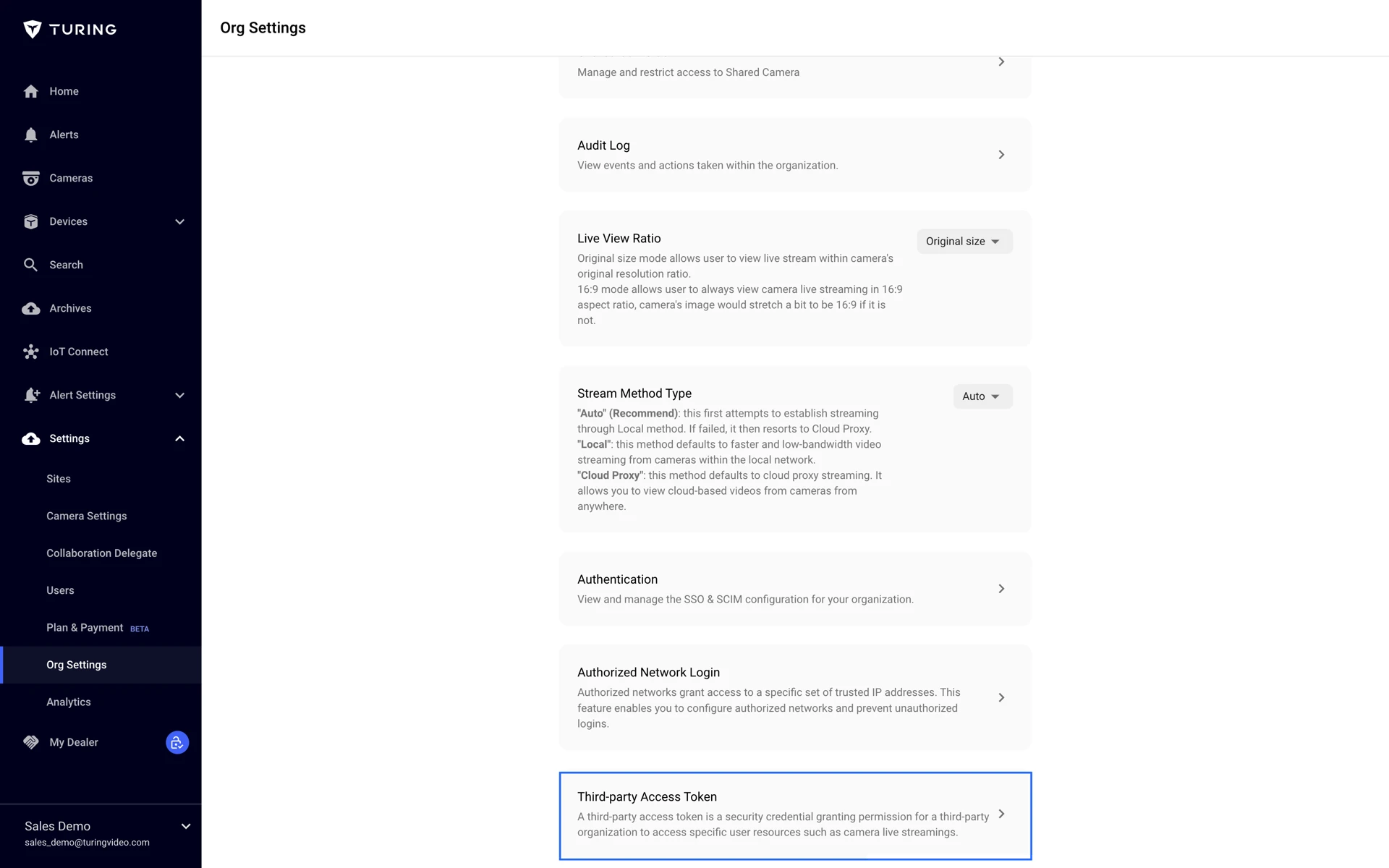
After enabling the third-party integration feature, an organization admin can create an Access Token:
- 1. Login to Turing Vision Portal
- 2. Navigate to Settings → Org Settings
- 3. Select the Third-party Access Token page
For token permission management, you can assign either "Integrator" or "No Access" roles to specific sites. The "Integrator" role grants permissions to fetch camera lists and view live streams via HLS.
Important Security Notice
Store your access token securely — it functions like your user credentials. If compromised, revoke it immediately from the Token Management Page.
Making API Requests
Attach your Access Token in the authorization header as a bearer token:
curl --location 'https://app.turingvideo.com/openapi/nest/camera/cameras?offset=0' \
--header 'Authorization: Bearer ' \
--header 'Accept: application/json'
Python Example
import requests

URL = 'https://app.turingvideo.com/openapi'
ACCESS_TOKEN = '<YOUR ACCESS TOKEN>'

def get_camera_list(base_url, access_token):
    headers = {
        'Authorization': f'Bearer {access_token}'
    }
    response = requests.get(
        f'{base_url}/nest/camera/cameras',
        headers=headers
    )
    if response.ok:
        return response.json()
    else:
        response.raise_for_status()

try:
    camera_list = get_camera_list(base_url=URL, access_token=ACCESS_TOKEN)
    print(camera_list)
except Exception as err:
    print(f'An error occurred: {err}')
Get Site List
Returns the array of sites that the access token is authorized to access.
GET https://app.turingvideo.com/openapi/bw/v2/site/sites/treeSite Object
| Parameter | Type | Description |
|---|---|---|
id | integer | Identifier for the site where the camera is installed |
name | string | Name of site |
type | string | "site" | "sub_site" |
children | array of Site Object | Sub sites of current site |
Response
{
  "err": {
    "ec": 0,
    "em": "This operation is successful.",
    "dm": "ok"
  },
  "ret": {
    "sites": [
      {
        "id": 1777,
        "name": "Demo Site 1 - San Mateo, CA",
        "type": "site",
        "children": [
          {
            "id": 17865,
            "name": "Main Site San Mateo",
            "type": "sub_site",
            "children": [
              {
                "id": 17866,
                "name": "Sub site san mateo",
                "type": "sub_site",
                "children": []
              }
            ]
          },
          {
            "id": 127043,
            "name": "Test",
            "type": "sub_site",
            "children": []
          }
        ]
      },
      {
        "id": 103064,
        "name": "Demo Site 2 - San Jose, CA",
        "type": "site",
        "children": [
          {
            "id": 108994,
            "name": "sjsub1",
            "type": "sub_site",
            "children": []
          }
        ]
      }
    ]
  },
  "ext": null,
  "ebd": null
}
Get Camera List
Fetches the list of cameras available to the authenticated token.
GET https://app.turingvideo.com/openapi/nest/camera/camerasQuery Parameters
| Parameter | Type | Description |
|---|---|---|
limit | integer | The maximum number of records to return. Default value: 50, minimum: 0, maximum: 50 |
offset | integer | A starting point for the list of returned records. Default value: 0 |
state | string | "running" | "offline" |
site_ids | string | A list of site_id separated by the "," |
camera_ids | string | A list of camera_id separated by the "," |
manufacturers | string | "Turing-U" | "Turing E" — Turing-U: Turing Smart Series, Turing-E: Turing Edge+ Series |
Camera Object
| Parameter | Type | Description |
|---|---|---|
org_code | string | Unique code representing the organization |
site_id | integer | Identifier for the site where the camera is installed |
id | integer | Camera unique identifier |
created_at | time.Time | Timestamp when the camera was created |
updated_at | time.Time | Timestamp when the camera was last updated |
name | string | Name of the camera |
state | string | Status of the camera: "running" | "offline" |
user_id | integer | Identifier for the user associated with the camera |
mac_address | string | MAC address of the camera |
serial_no | string | Serial number of the camera |
manufacturer | string | Manufacturer name: Turing-E (Turing Edge Series), Turing-U (Turing Smart Series) |
model | string | Model of the camera |
license | object | Camera's active license. Null if the camera does not have any active licenses |
License Object
| Parameter | Type | Description |
|---|---|---|
license_plan_name | string | License plan name: ["CORE AI", "Essential"] |
status | string | Status of the license |
Response
{
  "err": {
    "ec": 0,
    "em": "This operation is successful.",
    "dm": "ok"
  },
  "ret": {
    "total": 9,
    "offset": 0,
    "limit": 2,
    "cameras": [
      {
        "org_code": "frontend@turingvideo.com",
        "site_id": 1292,
        "site_name": "Demo Site 1",
        "id": 28229,
        "created_at": "2024-03-30T07: 03: 44.430657Z",
        "updated_at": "2024-05-23T20: 30: 51.610764Z",
        "name": "Turing-U-Timelapse",
        "state": "running",
        "user_id": 916,
        "mac_address": "28: 36: 13: 55: 75:0c",
        "serial_no": "210235TRGP3218001526",
        "manufacturer": "Turing-U",
        "model": "TP-MED5M28",
        "licenses": null
      },
      {
        "org_code": "frontend@turingvideo.com",
        "site_id": 100795,
        "site_name": "Demo Site 2",
        "id": 28230,
        "created_at": "2024-03-30T07: 03: 44.64704Z",
        "updated_at": "2024-05-23T20: 30: 49.539604Z",
        "name": "3rd w/o license",
        "state": "running",
        "user_id": 916,
        "mac_address": "e4:f1:4c: 30:4a:2f",
        "serial_no": "210235TL1N320C000030",
        "manufacturer": "—",
        "model": "SC-3245WD-I0-F28M",
        "licenses": {
          "license_plan_name": "CORE AI",
          "status": "active"
        }
      }
    ]
  },
  "ext": null,
  "ebd": null
}
Get Camera HLS Live Stream
Retrieves an HLS stream URL for live video. Requires Core AI license on the camera.
POST https://app.turingvideo.com/openapi/nest/live/hlsRequest Body
| Parameter | Type | Description |
|---|---|---|
camera_id | integer | Unique identifier for camera |
resolution | string | Resolution of the stream: "main" | "sub" | "third" |
{
  "camera_id": 20364,
  "resolution": "sub"
}
Response
| Parameter | Type | Description |
|---|---|---|
play_url | string | Camera's HLS URL |
{
  "err": {
    "ec": 0,
    "em": "This operation is successful.",
    "dm": "ok"
  },
  "ret": {
    "play_url": "https://srs.turingvideo.com/live/28311/3e7b2aa38a08988bb399848fe9a1eef9/87513db5db3144c8a26964ad2de48af3.m3u8"
  },
  "ext": null,
  "ebd": null
}
Note: HLS access is exclusively available to cameras with a Core AI license.
The HLS link will expire after 10 minutes. You need to use the token to query for the new one after 10 mins.
When playing the HLS link for the first time, it may take some time to generate the M3U8 segments.
Get Camera RTSP Live Stream
Initiates RTMP protocol streaming push. Requires Core AI license.
POST https://app.turingvideo.com/openapi/nest/live/push/startRequest Body
| Parameter | Type | Description |
|---|---|---|
protocol | string | Only support rtmp currently |
camera_id | integer | Unique identifier for camera |
resolution | string | Resolution of the stream: "main" | "sub" | "third" |
addr | string | The streaming push address |
{
  "protocol": "rtmp",
  "camera_id": 20364,
  "resolution": "sub",
  "addr": "rtmp://......"
}
Response
{
  "err": {
    "ec": 0,
    "em": "This operation is successful.",
    "dm": "ok"
  },
  "ret": {
    "play_url": "rtsp://srs.turingvideo.com/live/c191f8089ebe408d916e41531a909537"
  },
  "ext": null,
  "ebd": null
}
Note: Access to the camera's live stream URL is exclusively available to cameras with a Core AI license.
The link will expire after 10 minutes. You need to use the token to query for the new one after 10 mins.
Get Camera Playback
Returns a 10-minute segment of the camera's stream, starting from the specified start_time.
POST https://app.turingvideo.com/openapi/nest/stream/playbackRequest Body
| Parameter | Type | Description |
|---|---|---|
camera_id | integer | Unique identifier for camera |
resolution | string | Resolution of the stream: "main" | "sub" | "third" |
start_time | string | The start time for playback in UTC, formatted as "YYYY-mm-dd hh:mm:ss" |
protocol | string | "hls" |
{
  "camera_id": 28325,
  "start_time": "2024-08-07 19: 55: 00",
  "resolution": "sub",
  "protocol": "hls"
}
Response
| Parameter | Type | Description |
|---|---|---|
play_url | string | 10-minute segment of the camera's stream, starting from the requested start time |
{
  "err": {
    "ec": 0,
    "em": "This operation is successful.",
    "dm": "ok"
  },
  "ret": {
    "play_url": "https://srs.turingvideo.com/live/28325/3e7b2aa38a08988bb399848fe9a1eef9/87513db5db3144c8a26964ad2de48af3.m3u8"
  },
  "ext": null,
  "ebd": null
}
Note: Access to the camera's HLS live stream URL is exclusively available to cameras with a Core AI license.
The HLS link will expire after 10 minutes. You need to use the token to query for the new one after 10 mins.
When playing the HLS link for the first time, it may take some time to generate the M3U8 segments.
PTZ Presets
Get and apply preset positions for PTZ (Pan-Tilt-Zoom) cameras.
Get the PTZ Preset
GET https://app.turingvideo.com/openapi/nest/cameras/:camera_id/ptz/presetParam
| Parameter | Type | Description |
|---|---|---|
camera_id | string | The camera id |
Response
{
  "num": 2,
  "presets": [
    {
      "id": 1,
      "name": "Preset 1"
    },
    {
      "id": 2,
      "name": "Preset 2"
    }
  ]
}
Example
curl -X GET "https://app.turingvideo.com/openapi/nest/cameras/499/ptz/preset" \
-H "Content-Type: application/json" \
-H "Authorization: Bearer d525150cb4d84e8ba4b515f02f8273819228f5fccdff"
Set PTZ Preset: Currently, the "set PTZ preset" feature is not supported for direct configuration on the Vision platform. It requires logging into the camera's console to set it up. For now, this functionality is not supported via OpenAPI.
Apply the PTZ Preset
POST https://app.turingvideo.com/openapi/nest/cameras/:camera_id/ptz/preset/:preset_id/applyParam
| Parameter | Type | Description |
|---|---|---|
camera_id | string | The camera id |
preset_id | string | The preset id of the camera |
Response
{
  "err": {
    "ec": 0,
    "em": "This operation is successful.",
    "dm": "ok"
  },
  "ext": null,
  "ebd": null
}
Example
curl -X GET "https://app.turingvideo.com/openapi/nest/cameras/499/ptz/preset/:preset_id/apply" \
-H "Content-Type: application/json" \
-H "Authorization: Bearer d525150cb4d84e8ba4b515f02f8273819228f5fccdff"
PTZ Control
Send direct pan, tilt, zoom, and other control commands to PTZ cameras.
POST https://app.turingvideo.com/openapi/nest/cameras/:camera_id/ptz/controlBody
{
  "cmd": "turn_left",
  "h_speed": 5,  // 1 ~ 9
  "v_speed": 5   // 1 ~ 9
}| Parameter | Type | Description |
|---|---|---|
cmd | string | Pan/tilt/zoom/accessory command to execute (see supported commands below) |
h_speed | integer | Horizontal speed (1–9) |
v_speed | integer | Vertical speed (1–9) |
Supported Commands
turn_left turn_right turn_upper turn_lower turn_left_upper turn_left_lower turn_right_upper turn_right_lower zoom_in zoom_out focus_near focus_far iris_increase iris_decrease wiper_on wiper_off light_on light_off heater_on heater_off ir_on ir_off stop
Response
{
  "err": {
    "ec": 0,
    "em": "This operation is successful.",
    "dm": "ok"
  },
  "ext": null,
  "ebd": null
}
Example
curl -X GET "https://app.turingvideo.com/openapi/nest/cameras/499/ptz/control" \
-H "Content-Type: application/json" \
-H "Authorization: Bearer d525150cb4d84e8ba4b515f02f8273819228f5fccdff"
Speaker Audio Management
Manage audio playback on connected speakers and cameras. Supports preset audio clips, custom WAV file uploads, and real-time audio streaming.
Get Audio Clip List For Speaker
GET https://app.turingvideo.com/openapi/nest/devices/speaker/:device_id/audio/metadataResponse
{
  "err": {
    "ec": 0,
    "em": "This operation is successful.",
    "dm": "ok"
  },
  "ret": {
    "volume": 20,
    "audio_clip": [
      { "name": "bell1", "index": 0 },
      { "name": "bell2", "index": 1 },
      { "name": "bell3", "index": 2 },
      { "name": "bell4", "index": 3 },
      { "name": "bell5", "index": 4 },
      { "name": "userfile2", "index": 7 },
      { "name": "userfile5", "index": 10 }
    ]
  },
  "ext": null,
  "ebd": null
}
Example
curl -X GET -H "Content-Type: application/octet-stream" \
-H 'Authorization: Bearer 4b40a1a8c88942a58f934ed0c34579f7c309cc7ada52' \
"https://devgw.turingvideo.com/openapi/nest/devices/speaker/525/audio/metadata"
Play Audio Clip For Speaker
POST https://app.turingvideo.com/openapi/nest/devices/speaker/:device_id/audio/clipQuery Param
| Parameter | Type | Description |
|---|---|---|
media_id | integer | The index of the media file |
volume | integer | The volume to play the audio (0~100) |
Response
{
  "err": {
    "ec": 0,
    "em": "This operation is successful.",
    "dm": "ok"
  },
  "ext": null,
  "ebd": null
}
Example
curl -X POST \
-H 'Authorization: Bearer d525150cb4d84e8ba4b515f02f8273819228f5fccdff' \
"https://app.turingvideo.com/openapi/nest/devices/speaker/499/audio/clip?media_id=1"
Play Audio File For Speaker
POST https://app.turingvideo.com/openapi/nest/devices/speaker/:device_id/audio/fileQuery Param
| Parameter | Type | Description |
|---|---|---|
file_type | string | The file suffix of the media file (only support wav file currently) |
volume | integer | The volume to play the audio (0~100) |
Example
curl -X POST -H "Content-Type: application/octet-stream" \
-H 'Authorization: Bearer d525150cb4d84e8ba4b515f02f8273819228f5fccdff' \
--data-binary @test.wav \
"https://app.turingvideo.com/openapi/nest/devices/speaker/499/audio/file?file_type=wav"
Get Audio Device List
GET https://app.turingvideo.com/openapi/nest/devices/speaker/listGet Audio Metadata For Speaker
GET https://app.turingvideo.com/openapi/nest/devices/speaker/:device_id/audio/metadataExample
curl -X GET -H "Content-Type: application/octet-stream" \
-H 'Authorization: Bearer 4b40a1a8c88942a58f934ed0c34579f7c309cc7ada52' \
"https://app.turingvideo.com/openapi/nest/devices/speaker/525/audio/metadata"
Play Audio Stream For Speaker
POST https://app.turingvideo.com/openapi/nest/devices/speaker/:device_id/audio/streamQuery Param
| Parameter | Type | Description |
|---|---|---|
expire | integer | The expiration time for the audio push URL (default: 300 seconds) |
volume | integer | The volume for audio (1–100). If not set, the default speaker volume configuration is used |
Example
curl -X POST -H "Content-Type: application/octet-stream" \
-H 'Authorization: Bearer 4b40a1a8c88942a58f934ed0c34579f7c309cc7ada52' \
"https://app.turingvideo.com/openapi/nest/devices/speaker/525/audio/stream"
Supports the G.711 audio formats PCMU and PCMA.
Upload Audio Clip To Speaker/Camera
POST https://app.turingvideo.com/openapi/nest/devices/:device_type/:device_id/audio/uploadBody
| Parameter | Type | Description |
|---|---|---|
file_name | string | The file name of the audio clip file |
device_type | string | The device type (camera or speaker) |
device_id | string | The device id |
media_id | integer | The media id of the audio clip |
Example
curl -X POST -H "Content-Type: application/octet-stream" \
-H 'Authorization: Bearer d525150cb4d84e8ba4b515f02f8273819228f5fccdff' \
--data-binary @alarm.wav \
"https://app.turingvideo.com/openapi/nest/devices/speaker/499/audio/file?file_name=alarm.wav&media_id=0"
Currently, the OpenAPI for audio upload only supports the Turing speaker. Other speakers still need to upload audio through their respective consoles.
The file format supported by OpenAPI uploads is limited to WAV files, with PCM data in one of the following formats:
- PCM/uncompressed
- ITU G.711 a-law
- ITU G.711 µ-law
Supported sample rates: 8K, 16K, 32K, 22.05K, 44.1K, 48K
Bit depth: Signed 16
List Box List
Retrieve all connected boxes (NVR devices) and their current status.
GET https://app.turingvideo.com/openapi/boxesQuery Parameters
| Parameter | Type | Description |
|---|---|---|
limit | integer | The maximum number of records to return. Default value: 50, minimum: 0, maximum: 50 |
offset | integer | A starting point for the list of returned records. Default value: 0 |
state | string | "offline" | "online" |
site_ids | string | A list of site_id separated by the "," |
box_ids | string | A list of box_id separated by the "," |
Response
{
  "err": {
    "ec": 0,
    "em": "This operation is successful.",
    "dm": "ok"
  },
  "ret": {
    "total": 3,
    "offset": 0,
    "limit": 50,
    "boxes": [
      {
        "id": "box_cam_v1_000029",
        "created_at": "2022-12-09T02: 18: 46.694433Z",
        "updated_at": "2024-06-05T09: 10: 31.389327Z",
        "state": "offline",
        "site_id": 102736
      },
      {
        "id": "box_cam_v1_000042",
        "created_at": "2024-04-29T18: 38: 00.884591Z",
        "updated_at": "2024-07-18T18: 34: 09.970882Z",
        "state": "online",
        "site_id": 102736
      },
      {
        "id": "box_mini_v2_100013",
        "created_at": "2021-12-13T20: 32: 42.357963Z",
        "updated_at": "2024-07-01T19: 43: 38.754145Z",
        "state": "online",
        "site_id": 102736
      }
    ]
  },
  "ext": null,
  "ebd": null
}
Example (Dev)
curl --location 'https://dev-gw.turingvideo.com/openapi/boxes' \
--header 'Authorization: Bearer 463f9a2dd9ff4918a7b0f606477896ee143b40f46963' \
--header 'Accept: application/ecmascript'
Webhook
Webhook enables you to subscribe to all event data generated by Turing AI. Once configured, the webhook notification ensures that all AI results detected from camera events are automatically sent to the specified URL.
For more information, visit the Webhook Documentation.
Support & Contact
For more information and API support, contact Turing's support team:
Email Support
support@turingvideo.comDocumentation
turing.ai